The section “My calendar” offers a complete and interactive display of your work time, leave and requests. It was designed to give you complete visibility in your scheduling, allowing you to navigate easily between past and future events.
Calendar Views
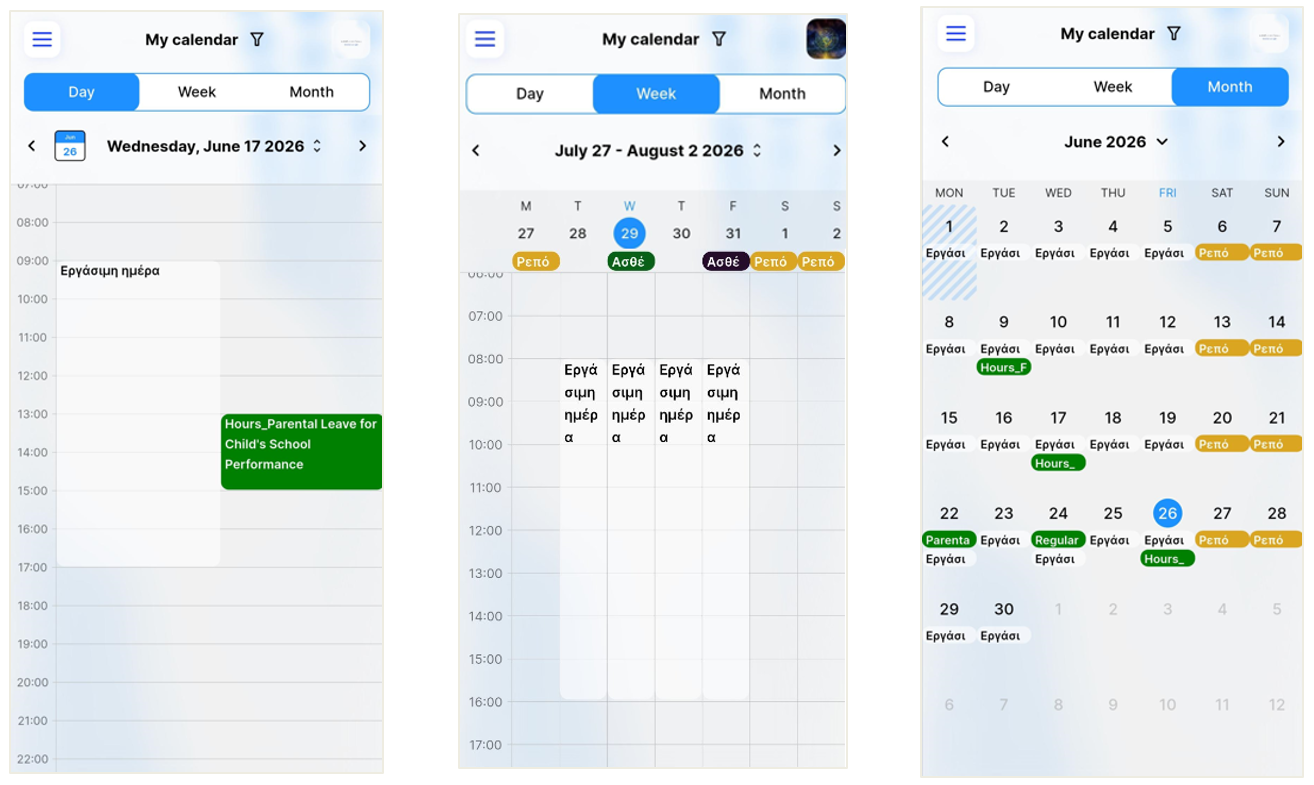
You can customize your schedule display by selecting from three analysis levels:
Month: For an overall picture of the monthly plan, showing aggregate business days, days off and approved leave.
Week: For more detailed monitoring of weekly working hours and scheduled absences.
Day: For full analysis of the day concerned, including precise work intervals or specific cases (e.g. Sick leave).
Smart Navigation & “Today” Mode
The application facilitates the immediate return to the present:
Next to the date listed at the top of the screen, there is a special calendar icon with the indication of the current day  .
.
No matter how far back or ahead you have browsed the calendar, tapping this icon automatically redirects you to today's date.
 Filters & Customization
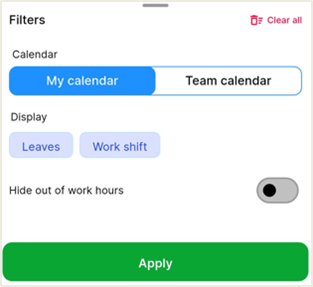
By pressing the filter icon in the top right  , you can choose what will appear on your screen:
Switch Calendars: Ability to view your personal calendar or team calendar. In the team's calendar you can see colleagues who are hierarchically on the same level as you. Since you are the supervisor, you can see both your team members and colleagues who are hierarchically on the same level as you.
Category Types: You can choose to show specific categories, such as “Leaves” or “Work shift”, to focus only on whatever is relevant in the given moment.