In the “Overview” option, you can track the balance of the eligible leave days.
At the top of the screen, there is a drop-down menu. By clicking on the arrow, you can select the specific type of leave you wish to check (e.g. Regular Leave, Parental School Leave, etc.). By selecting the type, the entire screen—diagrams and analytics—is automatically updated to display the data specific to that category.
Two circular charts show the “Available balance” and the “Remainder for the current year”, allowing you to know at any time the remaining number of days off.
The first chart shows the available leave balance, after the approved and pending leaves have been removed, while the second chart is the leave balance that includes only the days off that have been finalized in the payroll.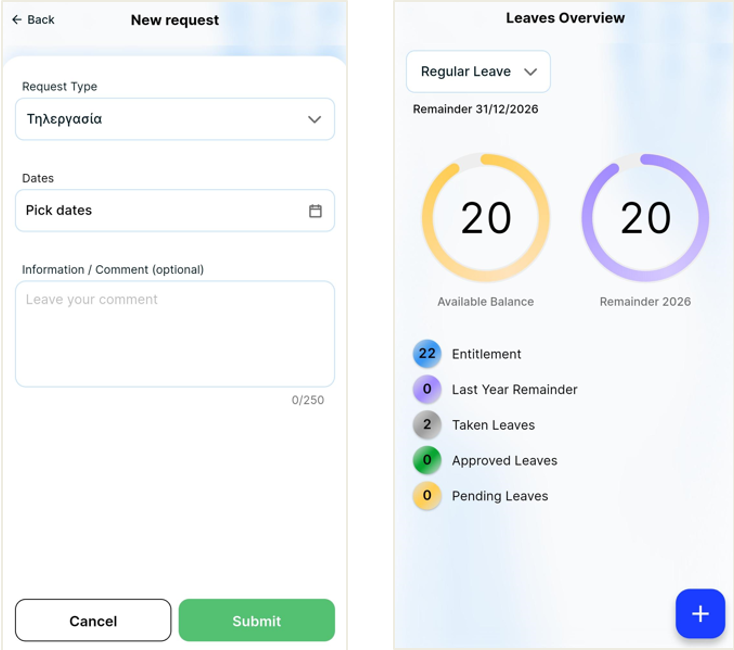
Additionally, detailed information is provided for:
the total eligible leave for the current year
last year’s remainder
leaves taken
leaves approved
all pending leaves.
Submitting a new request
By pressing the blue "+" button (at the bottom right), you can create a new request.
You can select the dates through the integrated calendar and add optional comments (up to 250 characters) to better inform your supervisor.
If the request type allows it, clicking on the attachment field allows you to download files from your device or use the camera to photograph a document.